
TextFieldBoxes 1.0.0
Material Design Guideline 里的新控件,看到没现成的就顺手糊了一个。

Github:
https://github.com/HITGIF/TextFieldBoxes
欢迎 Star,欢迎试用
要求
- Android 4.0.3 IceCreamSandwich (API lv 15) 或更高
- 你最喜欢的 IDE
安装
在你的项目中加入以下依赖:
Gradle:
allprojects {
    repositories {
      ...
      maven { url 'https://jitpack.io' }
    }
}
dependencies {
    compile 'com.github.HITGIF:TextFieldBoxes:1.0.0'
}
Maven:
<repositories>
    <repository>
         <id>jitpack.io</id>
         <url>https://jitpack.io</url>
    </repository>
</repositories>
<dependency>
    <groupId>com.github.HITGIF</groupId>
    <artifactId>TextFieldBoxes</artifactId>
    <version>1.0.0</version>
</dependency>
SBT:
resolvers += "jitpack" at "https://jitpack.io"
libraryDependencies += "com.github.HITGIF" % "TextFieldBoxes" % "1.0.0"
Leiningen:
:repositories [["jitpack" "https://jitpack.io"]]
:dependencies [[com.github.hitgif/textfieldboxes "1.0.0"]]
使用
1. 基础
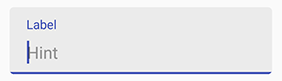
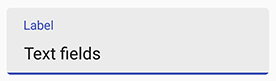
将 studio.carbonylgroup.textfieldboxes.TextFieldBoxes 加入你的布局文件:
...
<studio.carbonylgroup.textfieldboxes.TextFieldBoxes
    android:id="@+id/text_field_boxes"
    android:layout_width="match_parent"
    android:layout_height="wrap_content"
    android:hint="Hint" />
...
2. 启用 / 禁用
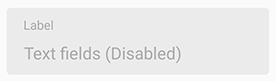
在 xml 中加入 app:enabled 或在 Java 代码中使用 setEnabled(boolean _enabled)。
app:enabled="false"
3. 单行
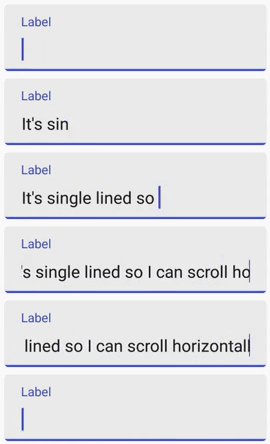
在 xml 中加入 app:singleLine 或在 Java 代码中使用 setSingleLine(boolean _singleLine) 以设置 EditText 是否为单行,即能够横向滚动。
app:singleLine="true"
4. 帮助和错误信息
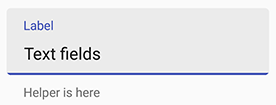
帮助信息:
在 xml 中加入 app:helperText 或在 Java 代码中使用 setHelperText(String _helperText)。
app:helperText="Helper is here"
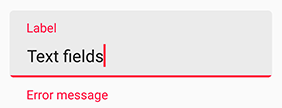
错误信息:
在 Java 代码中使用 setError(String _errorText)。
注意: 文本改动 (输入或删除) 时会自动清除错误信息。
setError("Error message");
5. 最大行数
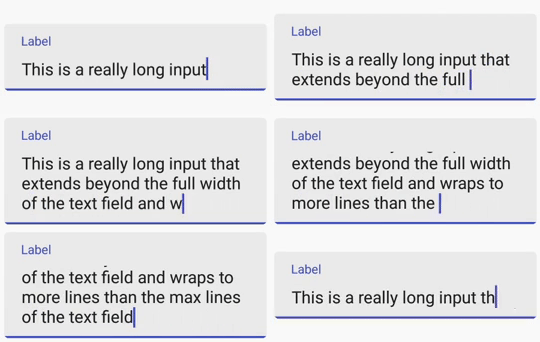
在 xml 中加入 app:maxLines 或在 Java 代码中使用 setMaxLines(Int _maxlines) 以设置文本框的最大行数。 默认值是 Integer.MAX_VALUE。
app:maxLines="3"
6. 最大和最小字符数
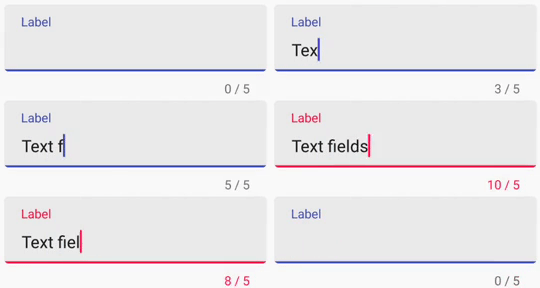
在 xml 中加入 app:maxCharacters 或在 Java 代码中使用 setMaxCharacters(int _maxCharacters) 以设置最大字符数, 在 xml 中加入 app:minCharacters 或在 Java 代码中使用 setMinCharacters(int _minCharacters) 以设置最小字符数。 当超出字符数限制时底部的线会变成 errorColor(默认为红色)。 默认值是 0, 表示没有限制。
注意: 空格和换行不计入字符数。
app:maxCharacters="10"
app:minCharacters="5"
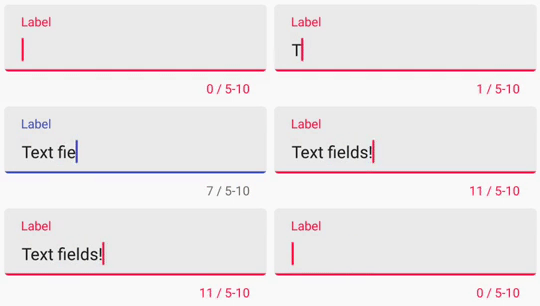
app:maxCharacters="5"
7. 自定义颜色
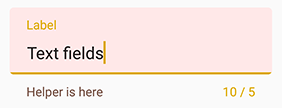
Primary Color 是底部的线和提示文字的颜色。 在 xml 中加入 app:primaryColor 或在 Java 代码中使用 setPrimaryColor(int _colorRes) 以设置。 默认值为目前主题的 Primary Color。
Error Color 是出现错误时显示的颜色 (e.g. 超出字符数限制, setError())。 在 xml 中加入 app:errorColor 或在 Java 代码中使用 setErrorColor(int _colorRes) 以设置. 默认值是 A400 red 。
Helper Text Color 是帮助文本的颜色。 在 xml 中加入 app:helperTextColor 或在 Java 代码中使用 setHelperTextColor(int _colorRes) 以设置。 默认值是 54% black 。
app:primaryColor="#1B5E20"      <!--绿的-->
app:errorColor="#ddaa00"        <!--黄的-->
app:helperTextColor="#795548"   <!--棕的-->

8. 自定义 EditText
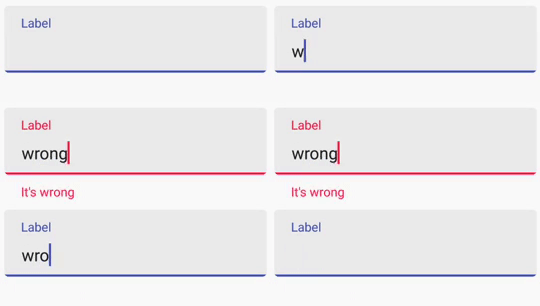
如果你想要自定义 TextFieldBoxes (其实是一个包含 EditText 的 FrameLayout 继承) 中的 EditText , 在 Java 代码中使用 getEditText() 就可以随便改 (e.g. setOnKeyListener(), addTextChangedListener())
final TextFieldBoxes textFieldBoxes = findViewById(R.id.text_field_boxes);
textFieldBoxes.getEditText().addTextChangedListener(new TextWatcher() {
    @Override
    public void beforeTextChanged(CharSequence charSequence, int i, int i1, int i2) {

    }

    @Override
    public void onTextChanged(CharSequence charSequence, int i, int i1, int i2) {

    }

    @Override
    public void afterTextChanged(Editable editable) {
    if (editable.toString().equals("wrong"))
        textFieldBoxes.setError("It's wrong");
    }
});
全部属性
文本
app:text EditText 文本。
app:hint 顶部的提示文本。
app:helperText 底部的帮助文本。
颜色
app:helperTextColor 帮助文本颜色。
app:errorColor 错误时的显示颜色 (e.g. 超出字符限制, setError())。
app:primaryColor 是底部的线和提示文字的颜色。 默认值为目前主题的 Primary Color。
字符统计
app:maxCharacters 最大字符数。 0 表示没有限制。 默认是 0。
app:minCharacters 最小字符数。 0 表示没有限制。 默认是 0。
其他
app:enabled 文本框是否启用。 默认值为 True。
app:singleLine EditText 是否为单行。 默认值为 False。
app:maxLines 文本框最大行数。 默认值为 Integer.MAX_VALUE。
app:hasFocus 文本框是否获得焦点。 默认值为 False。
TODO
- 前缀 & 后缀
- 图标
- 暗主题
开源许可
Copyright 2017 Carbonylgroup Studio

Licensed under the Apache License, Version 2.0 (the "License");
you may not use this file except in compliance with the License.
You may obtain a copy of the License at

    http://www.apache.org/licenses/LICENSE-2.0

Unless required by applicable law or agreed to in writing, software
distributed under the License is distributed on an "AS IS" BASIS,
WITHOUT WARRANTIES OR CONDITIONS OF ANY KIND, either express or implied.
See the License for the specific language governing permissions and
limitations under the License.

 1
1


 Select Language